
Introduction
A weighbridge plays an important role in logistics, factories, warehouses, mines, construction sites, and toll plazas. However, even a small fault can affect weighing accuracy and daily operations.
Common weighbridge errors may come from faulty load cells, damaged cables, poor earthing, unstable power, moisture, or wrong calibration. In addition, mud, stones, or other objects around the platform can affect its movement.
Fortunately, many weighbridge problems are easy to identify when you know what to check. Therefore, a step-by-step approach can save time, reduce downtime, and prevent unnecessary part replacement.
In this guide, we explain the 10 most common weighbridge errors, their causes, and how to troubleshoot them.
What Is a Weighbridge?
A weighbridge, also called a truck scale, is used to measure the weight of trucks and other heavy vehicles.
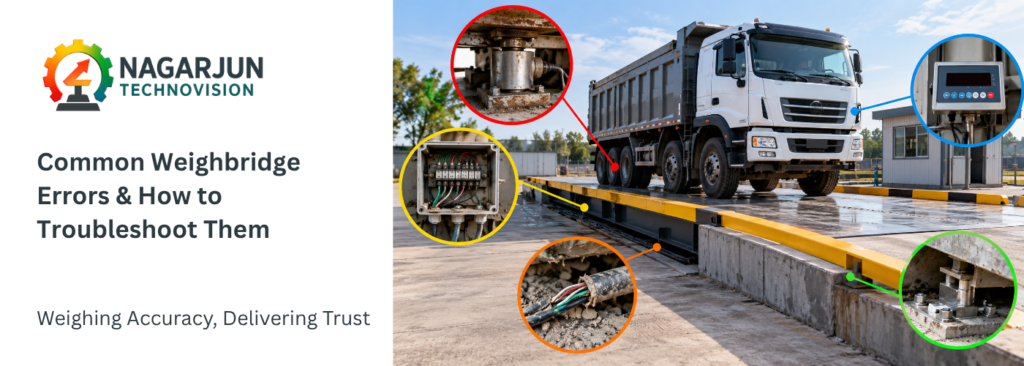
A standard electronic weighbridge usually includes:
- Weighbridge platform
- Load cells
- Junction box
- Weight indicator
- Load cell cables
- Power supply
- Earthing system
- Computer and weighing software
When a truck enters the platform, the load cells detect the applied weight. Next, the electrical signals travel to the junction box. The weight indicator then processes these signals and displays the final weight.
Because all these parts work together, a fault in one component can affect the complete weighing system.
10 Common Weighbridge Errors and How to Troubleshoot Them
1. Weight Reading Is Unstable or Fluctuating
An unstable reading is one of the most common weighbridge errors. For example, the displayed weight may continuously move up and down even when the truck is stationary.
Possible Causes
- Loose load cell connections
- Damaged load cell cables
- Water or moisture inside the junction box
- Faulty load cell
- Poor earthing
- Unstable power supply
- Electrical noise
- Platform touching another structure
- Mud, stones, or dirt around the platform
How to Troubleshoot
Start by making sure the truck is completely stationary. After that, inspect the platform and remove any mud, stones, or other material that may block its movement.
Also, check the junction box and load cell connections. Look for loose terminals, moisture, rust, or damaged wires.
If the reading still fluctuates, individual load cells may need testing. In addition, check the power supply and earthing because electrical problems can also cause unstable readings.
2. Weighbridge Does Not Return to Zero
Normally, the indicator should return to zero after the truck leaves the platform. However, sometimes it continues to show a positive or negative value.
Possible Causes
- Mud or debris under the platform
- Platform touching the foundation
- Load cell mounting problem
- Mechanical blockage
- Faulty load cell
- Wrong zero setting
- Junction box problem
How to Troubleshoot
Make sure the platform is completely empty before checking the zero value. Then, inspect the area underneath and around the weighbridge.
Remove any stones, mud, metal pieces, or other objects that may restrict platform movement.
Moreover, check whether the platform is touching the foundation or side structure. If everything looks normal but the zero error remains, inspect the load cells, junction box, and indicator.
Most importantly, do not keep resetting zero to hide the problem. Instead, find the actual cause of repeated zero drift.
3. Weighbridge Shows Incorrect Weight
Sometimes the weighbridge works normally but shows a weight that is higher or lower than expected. As a result, billing, loading, and vehicle records may also become inaccurate.
Possible Causes
- Calibration error
- Faulty load cell
- Wrong indicator settings
- Junction box imbalance
- Platform obstruction
- Damaged mounting parts
- Restricted platform movement
How to Troubleshoot
Begin by checking the weighbridge with an approved reference or test weight.
When the difference remains consistent, calibration may be required. However, an error that changes with the position of the vehicle could point to a load cell or balance problem.
Therefore, inspect the load cells, junction box, platform, and mounting parts before changing calibration settings.
4. Different Weight at Different Platform Positions
A correctly functioning weighbridge should provide consistent results when the load is placed at different appropriate positions on the platform. However, significant differences may indicate a corner or section error.
Possible Causes
- Load cells are out of balance
- Faulty load cell
- Junction box trimming issue
- Incorrect load cell mounting
- Mechanical obstruction
- Foundation settlement
How to Troubleshoot
First, perform a systematic section or corner test using an appropriate test load. Next, compare the readings at different positions.
If one section shows a significant difference, inspect the nearby load cell and its mounting arrangement. In addition, check the junction box trimming settings and platform movement.
5. Weight Indicator Has No Display
In some cases, the weight indicator may not switch on at all.
Possible Causes
- No electrical power
- Blown fuse
- Damaged power supply
- Loose power cable
- Indicator fault
- Lightning or surge damage
How to Troubleshoot
Start by checking whether power is available at the indicator.
Afterward, inspect the power cable, fuse, MCB, plug, UPS, and other connections. If the power supply is normal but the indicator remains off, the unit may need professional repair.
For safety, internal electronic repairs should be handled by trained technicians.
6. Weight Indicator Shows an Error Code
Digital weight indicators may display an error when they detect a problem. For instance, the error could relate to overload, load cell signals, communication, or calibration.
How to Troubleshoot
Write down the exact error code before making any changes. Next, check the indicator manual to understand what the code means.
A restart may clear a temporary fault. However, repeated errors should be investigated rather than ignored.
For example, a load cell signal error may require inspection of the load cells, cables, junction box, and related connections.
7. Weighbridge Reading Is Stuck
Sometimes the weight reading remains fixed even when the load changes.
Possible Causes
- Indicator problem
- Load cell signal failure
- Damaged cable
- Junction box fault
- Software problem
- Loose connection
How to Troubleshoot
Begin by checking whether the reading is stuck on the weight indicator, the computer, or both.
When the indicator works correctly but the computer does not, the issue is likely related to communication or software. In that case, inspect the communication cable, converter, network connection, and software settings.
On the other hand, if the indicator itself is stuck, check the load cell signal, wiring, junction box, and indicator.
8. Correct Weight on Indicator but Wrong Weight on Computer
A correct indicator reading with an incorrect computer value often points to a communication problem.
Possible Causes
- RS-232 or RS-485 communication fault
- Wrong COM port
- Baud rate mismatch
- Damaged communication cable
- Software settings
- Faulty converter
- Wrong communication protocol
How to Troubleshoot
Compare the indicator value with the value shown on the computer. When only the computer value is incorrect, focus on the communication system.
For example, check the COM port, baud rate, data bits, stop bits, parity, and software settings.
By doing this, you can identify the communication fault without making unnecessary changes to the weighbridge hardware.
9. Load Cell Failure
Load cells are key parts of an electronic weighbridge. Therefore, a faulty load cell can affect the accuracy of the complete system.
Signs of a Load Cell Problem
- Unstable weight
- Frequent zero drift
- Incorrect readings
- Different readings across sections
- Sudden changes in weight
- No response from one part of the platform
Common Causes
- Overloading
- Heavy impact
- Water entry
- Damaged cables
- Lightning
- Electrical surge
- Poor earthing
- Rust or corrosion
- Physical damage
How to Troubleshoot
A trained technician should normally test suspected load cells with suitable equipment.
During testing, several items may need checking, including signal output, supply voltage, resistance, cable condition, and mounting.
If one load cell behaves differently from the others, further testing may confirm whether repair or replacement is required.
10. Junction Box Problems
The junction box combines signals from all load cells and sends them to the weight indicator. As a result, a junction box fault can affect the complete weighing result.
Common Problems
- Water or moisture
- Rusted terminals
- Loose wiring
- Damaged adjustment parts
- PCB damage
- Poor cable sealing
- Surge damage
How to Troubleshoot
Open the junction box only if trained personnel are available to inspect it safely. Inside, look for moisture, dust, rust, loose wires, or damaged parts.
Also, check whether the cable entry points are properly sealed. After inspection or repair, close and seal the box correctly to help prevent future water entry.
Other Common Weighbridge Problems
Platform Touching the Foundation
A weighbridge platform must be able to transfer the applied load correctly through its load cells.
Mud, stones, damaged civil work, or inadequate clearance can cause the platform to touch surrounding structures.
This may result in:
- Incorrect weight
- Poor repeatability
- Zero-return problems
- Corner errors
Regular cleaning around and underneath the weighbridge is therefore an important part of preventive maintenance.
Damaged Load Cell Cables
Load cell cables can be damaged by rodents, vehicles, construction work, water, heat, or improper routing.
Never make temporary cable joints without considering signal integrity and environmental sealing.
A damaged cable should be inspected and repaired or replaced according to the equipment manufacturer’s recommendations.
Poor Earthing and Electrical Surge
Electronic weighing systems can be sensitive to electrical disturbances.
Poor earthing, voltage fluctuations, lightning, welding near the weighbridge, or heavy electrical equipment can potentially damage:
- Load cells
- Weight indicators
- Junction boxes
- Communication converters
- Computers and peripheral equipment
A properly designed earthing and surge protection system can help reduce these risks.
Quick Weighbridge Troubleshooting Table
| Problem | Possible Cause | What to Check |
|---|---|---|
| Weight fluctuating | Load cell or electrical issue | Load cells, wiring, JB and earthing |
| Not returning to zero | Platform blockage | Platform clearance and debris |
| Incorrect weight | Calibration or load cell issue | Test weight and load cells |
| Different section readings | Load cell imbalance | Section test and junction box |
| Indicator not working | Power issue | Supply, fuse and connections |
| Error code | Component fault | Error code and manual |
| Weight stuck | Signal problem | Indicator, JB and load cells |
| Wrong PC reading | Communication issue | Cable, port and software |
| Zero keeps changing | Load cell or blockage | Platform, JB and load cells |
| Problems after rain | Water entry | Junction box, cables and seals |
Step-by-Step Weighbridge Troubleshooting Process
When a weighbridge develops a fault, use a systematic troubleshooting process instead of replacing parts randomly.
1. Identify the Problem
Start by identifying the exact symptom. It may include unstable weight, incorrect readings, zero errors, a frozen display, communication failure, or different readings across platform sections.
Clearly identifying the problem makes it easier to find the possible cause.
2. Inspect the Platform
Next, examine the weighbridge platform and surrounding area. Look for mud, stones, debris, damaged parts, or contact between the platform and foundation.
Any obstruction should be removed before further testing.
3. Check the Power Supply
Make sure the indicator and connected equipment receive a stable power supply. In addition, inspect the UPS, MCB, power adapter, earthing, and surge protection where applicable.
4. Examine Cables and Connections
After checking the power supply, inspect the wiring for loose terminals, broken wires, damaged insulation, water entry, corrosion, or rodent damage.
5. Inspect the Junction Box
Moisture, loose terminals, damaged parts, or poor sealing inside the junction box can affect weighing performance. Therefore, these areas should be checked carefully.
6. Test the Load Cells
If earlier checks do not reveal the problem, individual load cells may need testing. A qualified technician should normally perform this work using suitable test equipment.
7. Verify Calibration
Once mechanical and electrical faults have been ruled out, verify the weighing accuracy with the correct calibration procedure and approved test weights.
How to Prevent Common Weighbridge Errors
Regular maintenance can prevent many common weighbridge problems. More importantly, early inspection can stop a small fault from becoming a major breakdown.
Keep the Platform Clean
Mud, stones, and debris can restrict platform movement. Therefore, clean the area around and underneath the weighbridge regularly.
Inspect Cables Regularly
Look for cuts, loose connections, water damage, and signs of rodent damage. In addition, make sure cables are protected from vehicles and other equipment.
Protect the Junction Box
Moisture inside the junction box can affect weighing signals. For this reason, inspect the seals, cable glands, and entry points regularly.
Maintain Proper Earthing
Good earthing and surge protection help protect electronic components. Moreover, regular electrical checks can reduce the risk of damage caused by voltage surges or lightning.
Control Vehicle Movement
Trucks should enter and leave the weighbridge at a controlled speed. Otherwise, sudden braking or heavy impact may place extra stress on the load cells and platform structure.
Avoid Overloading
Loads above the rated weighbridge capacity can damage important components. Therefore, operators should always follow the approved weighing capacity.
Verify Calibration
Periodic calibration helps confirm that the weighbridge is measuring correctly. However, the required frequency may depend on legal requirements, operating conditions, usage, and manufacturer recommendations.
Plan Preventive Maintenance
Finally, schedule regular inspections of the platform, load cells, junction box, indicator, cables, and electrical system. Preventive maintenance can identify developing faults before they cause unexpected downtime.
Troubleshooting vs Calibration
Troubleshooting and calibration are connected, but they serve different purposes.
Troubleshooting finds the cause of a fault and helps correct it. Calibration, however, checks whether the displayed weight matches a known reference load.
For example, a faulty load cell may cause unstable readings. In this situation, calibration alone will not solve the problem.
Therefore, repair the fault first. Afterward, calibrate the weighbridge when required to confirm its accuracy.
When Should You Call a Weighbridge Technician?
Operators can perform basic cleaning and visual checks. However, some problems require professional technical support to avoid inaccurate readings or further damage.
Contact a qualified weighbridge technician if you notice any of these issues:
- Fluctuating or unstable weight readings
- Repeated zero drift after the platform is empty
- Frequent calibration failures
- Signs of a faulty or damaged load cell
- Junction box faults or adjustment problems
- Recurring error codes on the weight indicator
- Visible damage to electrical parts or cables
- System faults after lightning or a power surge
- Inconsistent readings across different platform sections
In addition, recurring faults should be checked as soon as possible. Early diagnosis can reduce downtime and help prevent damage to other weighbridge components.
Most importantly, avoid unnecessary adjustments to the load cells, junction box, or weight indicator. Incorrect settings may affect weighing accuracy and make the actual fault more difficult to identify.
Why Regular Weighbridge Maintenance Matters
A weighbridge may handle hundreds of heavy vehicles during daily operations. As a result, dirt, moisture, electrical faults, and regular wear can affect its performance over time.
Regular maintenance, therefore, helps detect problems early and keeps the weighing system working reliably. Moreover, timely inspections can reduce unexpected downtime, prevent costly repairs, and extend the life of key components.
For high-traffic sites, preventive maintenance should be part of the regular operating plan. This approach helps maintain accurate weighing while reducing the risk of sudden breakdowns.
Need Weighbridge Troubleshooting or Maintenance Support?
Nagarjun Technovision provides reliable weighing solutions and technical support for industrial and vehicle weighing systems.
Our services include weighbridge inspection, troubleshooting, load cell testing, indicator diagnosis, calibration support, component replacement, preventive maintenance, and system servicing. In addition, our technical team helps identify faults before they lead to longer downtime or costly repairs.
If you are facing unstable weight readings, zero errors, load cell faults, indicator problems, junction box issues, or communication failures, a proper system check can help find the root cause. As a result, the right corrective action can restore accurate and reliable weighing performance.
For professional weighbridge troubleshooting and maintenance support, contact Nagarjun Technovision.
Nagarjun Technovision
Weighing Accuracy, Delivering Trust.
Conclusion
Common weighbridge errors include unstable weight, zero drift, incorrect readings, load cell faults, junction box problems, indicator errors, and communication failures.
Fortunately, systematic troubleshooting can help identify these problems quickly. Start with the platform and mechanical parts before moving to the power supply, cables, junction box, and load cells. Afterward, examine the indicator and communication system. Calibration can then be verified if required.
In addition, regular preventive maintenance can reduce unexpected failures. As a result, businesses can improve weighing reliability, reduce downtime, and avoid unnecessary repairs.
Frequently Asked Questions
1. Why does my weighbridge weight keep fluctuating?
Fluctuating readings may come from loose connections, faulty load cells, moisture, poor earthing, damaged cables, or unstable power. Therefore, start by checking the platform, wiring, junction box, and electrical supply.
2. Why is my weighbridge not returning to zero?
Mud, stones, platform blockage, load cell faults, or junction box problems may cause zero errors. Before changing any settings, check that the empty platform can move freely.
3. How do I know if a weighbridge load cell is faulty?
Common signs include unstable readings, zero drift, incorrect weight, and different readings across platform sections. However, proper electrical testing is usually needed to confirm a load cell fault.
4. Why does the same truck show different weights?
Several factors can cause different readings, including platform blockage, load cell problems, vehicle position, and calibration errors. Therefore, repeated differences should be investigated.
5. Can poor earthing affect a weighbridge?
Yes. Poor earthing can increase the risk of electrical noise and surge-related damage. For this reason, earthing should be checked during regular maintenance.
6. Can rain affect a weighbridge?
A properly installed system is designed for outdoor use. However, damaged seals or cables may allow water to enter the junction box or connections. As a result, problems that appear after rain should be investigated.
7. Why is the indicator correct but the computer weight is wrong?
Usually, this points to a communication or software issue. Therefore, check the communication cable, converter, COM port, baud rate, protocol, and software settings.
8. Should I calibrate whenever the weight is incorrect?
Not always. First, check for mechanical, electrical, load cell, cable, and junction box problems. Once the fault is fixed, calibration can be carried out if required.