
Introduction
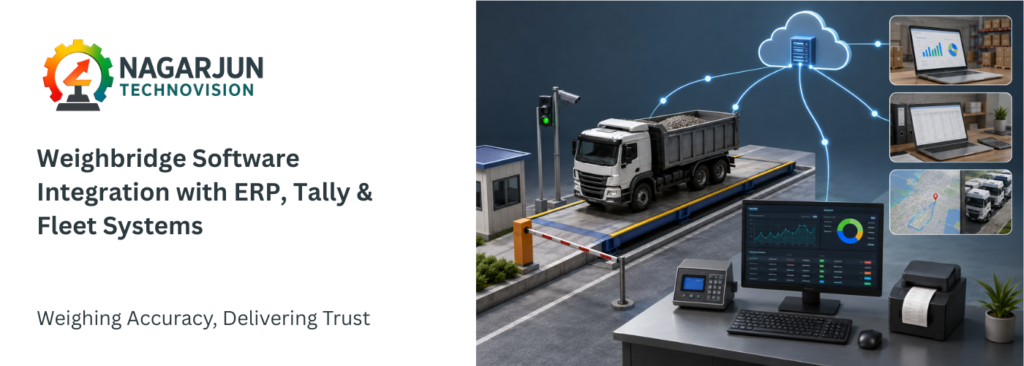
In today’s data-driven industrial environment, a weighbridge is no longer just a weighing device. Modern businesses require seamless weighbridge software integration to connect weighing operations with ERP systems, accounting platforms like Tally, and fleet management software. This integration eliminates manual data entry, improves operational efficiency, and provides real-time visibility across the organization.
Whether you operate in logistics, mining, manufacturing, agriculture, waste management, or infrastructure projects, integrating your weighbridge with business software can significantly improve productivity and accuracy.
This guide explains how weighbridge software integration works, its benefits, implementation process, and best practices for connecting your weighbridge with ERP, Tally, and fleet management systems.v
What is Weighbridge Software Integration?
Weighbridge software integration is the process of connecting a weighbridge system with other business applications so that weight data is automatically shared across platforms.
Instead of manually entering vehicle weights into accounting or management systems, the weighbridge software automatically transfers information such as:
- Gross weight
- Tare weight
- Net weight
- Vehicle number
- Driver details
- Material type
- Supplier information
- Customer information
- Date and time of weighing
As a result, businesses achieve faster processing, fewer errors, and improved data consistency.
Why Businesses Need Weighbridge Software Integration
Many organizations still rely on manual recording and data entry. However, manual processes often lead to:
- Data entry mistakes
- Duplicate records
- Delayed reporting
- Increased administrative workload
- Difficulty tracking vehicle movements
- Inaccurate inventory records
By implementing weighbridge software integration, companies can automate these processes and ensure that information flows smoothly between departments.
Key Benefits
1. Reduced Human Errors
Automatic data transfer eliminates typing mistakes and reduces discrepancies between systems.
2. Faster Transaction Processing
Vehicle weighing records are instantly available across connected software platforms.
3. Improved Reporting
Managers gain access to real-time reports and dashboards for operational decision-making.
4. Better Inventory Control
Weight data can automatically update stock and inventory records.
5. Enhanced Compliance
Digital records provide traceability and support audit requirements.
6. Increased Productivity
Employees spend less time on paperwork and more time on value-added tasks.
Components of a Typical Integrated Weighbridge System
A fully integrated weighbridge setup generally includes:
Weighbridge Hardware
The physical weighing platform equipped with load cells and indicators.
Weight Indicator
Captures and displays weight readings from the load cells.
Weighbridge Management Software
Acts as the central platform for recording, storing, and processing weighing data.
Database Server
Stores transaction records securely for future access and reporting.
ERP System
Handles procurement, inventory, sales, production, and financial operations.
Tally Software
Manages accounting and financial records.
Fleet Management System
Tracks vehicle movements, routes, fuel consumption, and logistics operations.
How Weighbridge Software Integration Works
The integration process typically follows these steps:
Step 1: Vehicle Arrives at the Weighbridge
The vehicle enters the weighbridge platform for weighing.
Step 2: Weight Data is Captured
The indicator sends weight information to the weighbridge software.
Step 3: Additional Information is Added
The system records details such as:
- Vehicle registration number
- Customer name
- Material type
- Supplier details
- Destination
Step 4: Data is Validated
The software checks for missing or incorrect information before processing.
Step 5: Automatic Data Transfer
The data is automatically transmitted to connected systems such as ERP, Tally, or fleet management software.
Step 6: Reports are Generated
Managers can access real-time operational and financial reports.
Integrating a Weighbridge with ERP Systems
ERP systems serve as the backbone of many organizations. Integrating weighbridge software with ERP solutions creates a seamless flow of operational data.
Common ERP Systems Used with Weighbridges
- SAP
- Oracle ERP
- Microsoft Dynamics 365
- Odoo
- ERPNext
- Infor ERP
ERP Integration Benefits
Automated Inventory Updates
Incoming and outgoing material weights automatically update stock records.
Streamlined Procurement
Purchase orders can be validated against actual received weights.
Production Monitoring
Raw material consumption can be tracked accurately.
Improved Billing Accuracy
Invoices are generated based on verified weight transactions.
Better Data Visibility
All departments access the same accurate information.
Integrating a Weighbridge with Tally
Many businesses in India use Tally for accounting and inventory management. Connecting a weighbridge to Tally eliminates repetitive data entry and improves financial accuracy.
How Tally Integration Works
The weighbridge software exports transaction data directly into Tally through:
- XML integration
- API integration
- CSV import/export
- Database synchronization
Benefits of Tally Integration
Faster Invoice Generation
Weight-based transactions can automatically generate sales vouchers.
Accurate Inventory Records
Stock quantities are updated based on actual weighed materials.
Reduced Accounting Workload
Manual entry of weight slips is minimized.
Better Financial Reporting
Accounting records remain synchronized with physical transactions.
Example Workflow
- Truck arrives with material.
- Gross and tare weights are recorded.
- Net weight is calculated automatically.
- Data is transferred to Tally.
- Sales or purchase voucher is generated.
- Inventory records are updated instantly.
Integrating a Weighbridge with Fleet Management Systems
Fleet management software helps organizations monitor vehicle operations. Integrating weighbridge software enhances visibility and logistics control.
Information Shared with Fleet Systems
- Vehicle identification
- Entry and exit times
- Weight records
- Route information
- Load utilization
- Delivery status
Benefits of Fleet Integration
Improved Vehicle Tracking
Managers know exactly when vehicles enter and leave facilities.
Optimized Fleet Utilization
Weight data helps maximize vehicle loading efficiency.
Reduced Turnaround Time
Faster weighing reduces waiting times.
Better Fuel Efficiency
Vehicles can be loaded according to optimal weight limits.
Enhanced Logistics Planning
Historical data supports route and scheduling decisions.
Technologies Used in Weighbridge Software Integration
Modern weighbridge software integration relies on several technologies.
APIs (Application Programming Interfaces)
APIs allow real-time communication between software systems.
Database Connectivity
Direct database integration enables seamless data sharing.
Cloud Platforms
Cloud-based systems support remote access and centralized monitoring.
RFID Technology
RFID tags automatically identify vehicles during weighing.
ANPR Systems
Automatic Number Plate Recognition helps capture vehicle details without manual input.
IoT Connectivity
Internet of Things devices provide real-time monitoring and reporting.
Common Challenges During Integration
Although integration offers significant benefits, organizations may encounter certain challenges.
Legacy Systems
Older weighbridge equipment may not support modern communication protocols.
Data Compatibility Issues
Different software platforms may use different data formats.
Network Limitations
Reliable connectivity is necessary for real-time synchronization.
User Training Requirements
Employees must understand new workflows and software features.
Security Concerns
Data must be protected through proper authentication and encryption.
Best Practices for Successful Weighbridge Software Integration
To achieve maximum benefits, organizations should follow these recommendations.
Choose Compatible Software
Verify compatibility between weighbridge software and existing business systems.
Define Integration Goals
Clearly identify operational objectives before implementation.
Standardize Data Formats
Maintain consistent naming conventions and data structures.
Conduct Thorough Testing
Test all workflows before deploying the system.
Train Staff Properly
Ensure users understand the integrated environment.
Monitor Performance Regularly
Review system logs and reports to identify issues early.
Maintain Data Backups
Regular backups protect valuable transaction records.
Future Trends in Weighbridge Software Integration
The future of weighbridge software integration is becoming increasingly intelligent and automated.
Emerging trends include:
- Cloud-based weighbridge platforms
- AI-powered analytics
- Predictive maintenance
- Mobile applications
- Real-time dashboard reporting
- GPS-integrated fleet monitoring
- Advanced RFID automation
- Smart logistics ecosystems
- IoT-enabled weighing infrastructure
These innovations will further improve efficiency, accuracy, and operational visibility.
Conclusion
Modern businesses can no longer afford disconnected systems and manual data entry. Weighbridge software integration enables organizations to connect weighbridge operations with ERP systems, Tally, and fleet management platforms, creating a unified flow of accurate information.
By automating data transfer, reducing human errors, improving inventory management, and enhancing operational visibility, integrated weighbridge solutions deliver substantial business value. As digital transformation continues across industries, investing in reliable weighbridge software integration will become an essential step toward smarter and more efficient operations.
Frequently Asked Questions (FAQs)
1. What is weighbridge software integration?
Weighbridge software integration is the process of connecting a weighbridge system with business applications such as ERP software, Tally, and fleet management systems. This allows weight data to be transferred automatically, reducing manual entry and improving accuracy.
2. Can a weighbridge be integrated with Tally?
Yes, modern weighbridge software can be integrated with Tally through APIs, XML files, or database connections. This helps automate invoicing, inventory updates, and accounting processes.
3. What are the benefits of integrating a weighbridge with an ERP system?
ERP integration enables automatic inventory management, purchase and sales tracking, real-time reporting, improved billing accuracy, and better operational visibility across departments.
4. How does fleet management integration improve weighbridge operations?
Fleet management integration allows businesses to track vehicle movements, monitor loading efficiency, reduce turnaround times, and optimize logistics operations using real-time weighbridge data.
5. Is weighbridge software integration suitable for small businesses?
Yes, businesses of all sizes can benefit from weighbridge software integration. Even small operations can reduce manual work, improve record accuracy, and streamline daily processes through automation.
6. What technologies are commonly used for weighbridge integration?
Common technologies include APIs, cloud-based platforms, RFID systems, Automatic Number Plate Recognition (ANPR), database connectivity, and IoT-enabled devices for real-time data sharing.
7. How long does it take to implement weighbridge software integration?
Implementation time depends on the complexity of the system and the software being connected. Basic integrations may take a few days, while advanced ERP and fleet management integrations can take several weeks to complete and test.